REMOVAL PROCEDURE 1. PRECAUTION NOTICE: After
turning the ignition switch off, waiting time may be required before
disconnecting the cable from the battery terminal. Therefore, make sure
to read the disconnecting the cable from the battery terminal notice
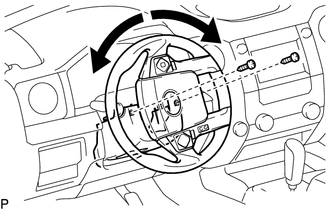
before proceeding with work (See page 2. DISCONNECT CABLE FROM NEGATIVE BATTERY TERMINAL CAUTION: Wait at least 90 seconds after disconnecting the cable from the negative (-) battery terminal to prevent airbag and seat belt pretensioner activation. 3. REMOVE UPPER STEERING COLUMN COVER
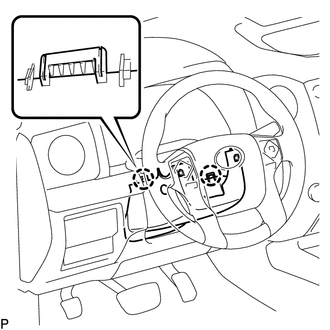
(b) Detach the 4 clips.
4. REMOVE LOWER STEERING COLUMN COVER
5. REMOVE INSTRUMENT SIDE PANEL LH Click here
6. REMOVE FRONT DOOR SCUFF PLATE LH Click here 7. REMOVE COWL SIDE TRIM BOARD LH Click here 8. REMOVE LOWER INSTRUMENT PANEL FINISH PANEL SUB-ASSEMBLY LH 9. REMOVE LOWER NO. 1 INSTRUMENT PANEL AIRBAG ASSEMBLY 10. REMOVE NO. 3 AIR DUCT SUB-ASSEMBLY 11. REMOVE MULTIPLEX TILT AND TELESCOPIC ECU
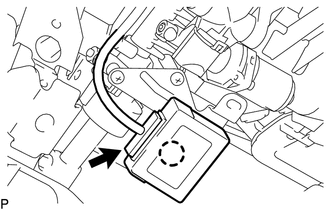
(b) Detach the claw to remove the multiplex tilt and telescopic ECU. |
Toyota Tundra Owners Manual > Instrument cluster: Gauges and meters
Tachometer Displays the engine speed in revolutions per minute Engine oil pressure gauge Displays the engine oil pressure Outside temperature display Displays the outside temperature within the range of -40ºF (-40ºC) to 122ºF (50ºC). Low outside temperature indicator comes on when the ambient t ...

 ).
).