
INSTALLATION PROCEDURE 1. INSTALL UNLOCK WARNING SWITCH ASSEMBLY 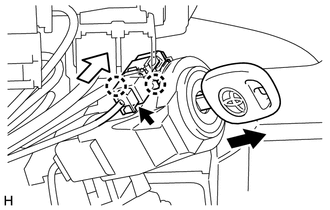
(a) Attach the 2 claws to install the unlock warning switch assembly onto the upper steering column bracket assembly. HINT: Slide the unlock warning switch assembly in the direction shown by the arrow in the illustration to install it. (b) Remove the key. (c) Connect the connector. Text in Illustration
2. INSTALL UPPER STEERING COLUMN COVER (for Power Tilt and Power Telescopic Steering Column)
3. INSTALL LOWER STEERING COLUMN COVER (for Power Tilt and Power Telescopic Steering Column)
4. INSTALL UPPER STEERING COLUMN COVER (for Manual Tilt and Manual Telescopic Steering Column)
5. INSTALL LOWER STEERING COLUMN COVER (for Manual Tilt and Manual Telescopic Steering Column)
6. INSTALL UPPER STEERING COLUMN COVER (for Manual Tilt)
7. INSTALL LOWER STEERING COLUMN COVER (for Manual Tilt)
|
Toyota Tundra Service Manual > Audio / Video: Front Door Speaker(for Double Cab)
ComponentsCOMPONENTS ILLUSTRATION ILLUSTRATION InspectionINSPECTION PROCEDURE 1. INSPECT FRONT NO. 1 SPEAKER ASSEMBLY (for Standard) (a) Measure the resistance according to the value(s) in the table below. Standard resistance: Tester Connection Condition Specified Condition 1 - 2 Always 3.2 to 4.8 ...


