
CAUTION / NOTICE / HINT NOTICE:
PROCEDURE
(a) Check if the vehicle is in an environment where reception is difficult due to something blocking the area above the vehicle. 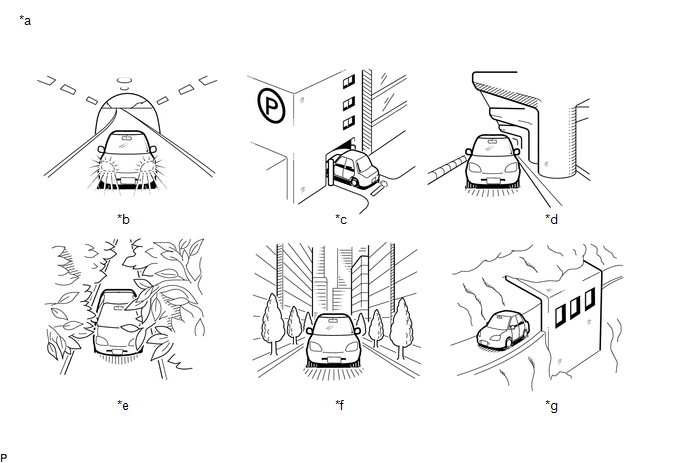 Text in Illustration Text in Illustration
HINT: If the area above the vehicle is blocked, such as when in a building or tunnel, reception may not be possible. OK: Area above vehicle is not blocked.
(a) Check if CH001 (free broadcast) can be received. OK: CH001 can be received.
(a) Check the display screen. Result
(a) Check if the pay-type contract has been extended, or if the contract period has ended. OK: Pay-type contract is valid.
(a) Perform activation refresh by referring to the satellite radio company web site (https://care.siriusxm.com/retailrefresh_view.action). HINT: The XM radio ID that is necessary to perform activation refresh is displayed when CH000 is selected on the satellite radio. OK: Malfunction disappears.
(a) Check the display screen. Result
(a) Replace the satellite radio antenna assembly with a known good one (See page
(b) Check if radio broadcasts can be received normally. OK: Radio broadcasts can be received normally.
(a) Replace the stereo component tuner assembly with a known good one. for Column Shift Type: See page for Floor Shift Type: See page
(b) Check if radio broadcasts can be received normally. OK: Radio broadcasts can be received normally.
(a) Confirm if CH000 is currently selected. OK: CH000 is selected.
|
Toyota Tundra Service Manual > Front Upper Suspension Arm: Reassembly
REASSEMBLY PROCEDURE 1. INSTALL FRONT UPPER BALL JOINT DUST COVER LH (a) Pack the upper arm ball joint with MP grease. Grease capacity: 5.0 to 7.0 g (0.176 to 0.247 oz.) (b) Using a snap ring expander, install the dust cover set ring. 2. INSTALL FRONT SUSPENSION UPPER ARM BUSH (a) Using SST and a pr ...


