
Toyota Tundra Service Manual: Terminals Of Ecu

TERMINALS OF ECU

1. CHECK NAVIGATION RECEIVER ASSEMBLY
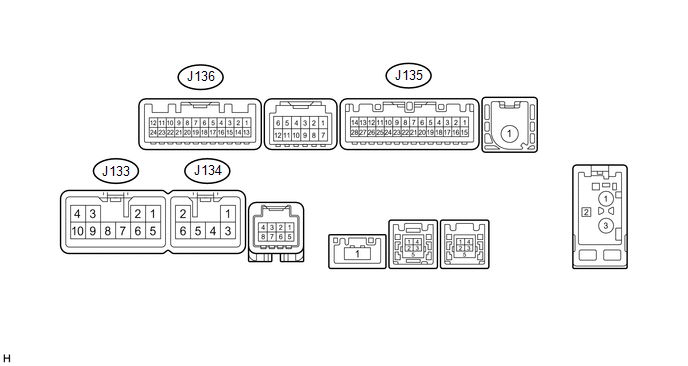
(a) Disconnect the J133 and J135 navigation receiver assembly connectors.

(b) Measure the voltage and resistance according to the value(s) in the table below.

Terminal No. (Symbol)

Wiring Color

Terminal Description

Condition

Specification

J133-3 (ACC1) - J133-7 (GND1)

GR - BR

Power source (ACC)

Ignition switch off

Below 1 V

Ignition switch ACC

11 to 14 V

J133-4 (+B1) - J133-7 (GND1)

LA-SB - BR

Power source (+B)

Always

11 to 14 V

J133-7 (GND1) - Body ground

BR - Body ground

Ground

Always

Below 1 Ω

J135-1 (IG) - J133-7 (GND1)

BE - BR

Power source (IG)

Ignition switch off

Below 1 V

Ignition switch ON

11 to 14 V

(c) Reconnect the J133 and J135 navigation receiver assembly connectors.

(d) Measure the voltage and waveform according to the value(s) in the table below.

Terminal No. (Symbol)

Wiring Color

Terminal Description

Condition

Specification

J135-2 (REV) - J133-7 (GND1)

Y - BR

Reverse signal

Ignition switch ON, shift lever in R

7.5 to 14 V

Ignition switch ON, shift lever not in R

Below 1 V

J136-11 (CA+) - J136-23 (CGND)

B - Shielded

Power source

Ignition switch ACC

5.5 to 7.05 V

J136-12 (V+) - J136-24 (V-)

R - W

Display signal

Ignition switch ON

Pulse generation (See waveform 1)

Ignition switch ON, screen blacked out by covering camera lens

Pulse generation (See waveform 2)

J136-23 (CGND) - Body ground

Shielded - Body ground

Shielded ground

Always

Below 1 Ω

(e) Using an oscilloscope, check the waveform.
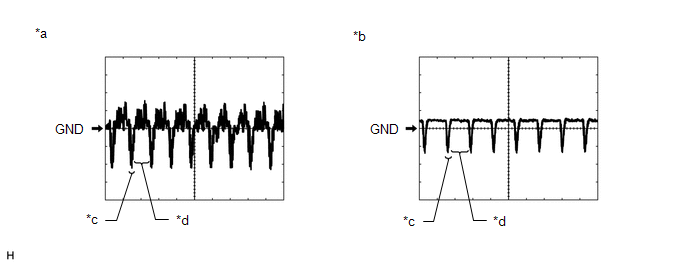
*a

Waveform 1

*b

Waveform 2

*c

Synchronization Signal

*d

Video Waveform

(1) Waveform 1

Measurement Condition

Item

Content

Terminal No. (Symbol)

J136-12 (V+) - J136-24 (V-)

Tool Setting

0.2 V/DIV., 50 μs/DIV.

Condition

Ignition switch ON

HINT:

The video waveform changes according to the image sent by the television camera assembly.

(2) Waveform 2

Measurement Condition

Item

Content

Terminal No. (Symbol)

J136-12 (V+) - J136-24 (V-)

Tool Setting

0.2 V/DIV., 50 μs/DIV.

Condition

Ignition switch ON, screen blacked out by covering camera lens

HINT:

The video waveform changes according to the image sent by the television camera assembly.

    System Diagram

    Rear View Monitor System(for Radio And Display Type)

    See More:

    Toyota Tundra Service Manual > Navigation System: Dtc Check / Clear
    DTC CHECK / CLEAR 1. CHECK DTC (CHECK USING TECHSTREAM) (a) Connect the Techstream to the DLC3. (b) Turn the ignition switch to ON. (c) Turn the Techstream on. (d) Enter the following menus: Body Electrical / Navigation System / Trouble Codes. (e) Check for DTCs, and then write them down. (f) Check ...

    Toyota Tundra Owners Manual

    Toyota Tundra Service Manual

    © 2026 Copyright www.ttundra.com
    0.0169