REMOVAL PROCEDURE 1. PRECAUTION NOTICE: After
turning the ignition switch off, waiting time may be required before
disconnecting the cable from the battery terminal. Therefore, make sure
to read the disconnecting the cable from the battery terminal notice
before proceeding with work (See page 2. DISCONNECT CABLE FROM NEGATIVE BATTERY TERMINAL 3. REMOVE FAN AND GENERATOR V BELT (a) Remove the fan and generator V belt (See page
4. REMOVE AIR CLEANER ASSEMBLY
5. REMOVE FRONT FENDER APRON SEAL RH 6. DISCONNECT POWER STEERING OIL PRESSURE SWITCH CONNECTOR 7. DISCONNECT VANE PUMP ASSEMBLY 8. REMOVE GENERATOR ASSEMBLY
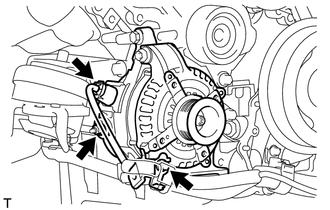
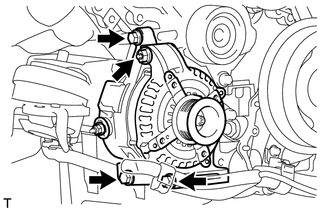
(b) Disconnect the generator connector. (c) Remove the nut and disconnect the generator wire. (d) Remove the bolt and disconnect the wire harness bracket from the generator.
|
Toyota Tundra Service Manual > Trailer Brake Control Switch: Removal
REMOVAL CAUTION / NOTICE / HINT NOTICE: When replacing the trailer brake control switch, the stored gain value is reset. Before replacing the trailer brake control switch, record the set gain value. HINT: After replacing the trailer brake control switch, the gain value is set to 5.0 (initial value). ...