
Radio operation
Select "AM" or "FM" on the "Select Audio Source" screen to
begin listening to the radio.
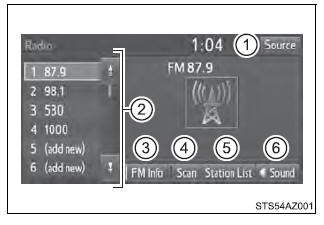
Audio control screen
*: FM only Selecting a station Tune in to the desired station using one of the following methods.
■ Seek tuning
Press the " The radio will begin seeking up or down for a station of the nearest frequency and will stop when a station is found. ■ Manual tuning Turn the "TUNE*SCROLL" knob. ■ Preset stations Select the desired preset station. Setting station presets 1. Search for desired stations by turning the "TUNE*SCROLL" knob or
pressing the " 2. Select "(add new)" To change the preset station to a different one, select and hold the preset station. 3. Select "Yes". 4. Select "OK" after setting the new preset station. ■ Refreshing the station list Select "Refresh" on the "Station List" screen. To cancel the refresh, select "Cancel Refresh". ■Reception sensitivity Maintaining perfect radio reception at all times is difficult due to the continually changing position of the antenna, differences in signal strength and surrounding objects, such as trains, transmitters, etc. |
Toyota Tundra Service Manual > Rear Cross Traffic Alert Buzzer(for Double Cab): Installation
INSTALLATION PROCEDURE 1. INSTALL BLIND SPOT MONITOR BUZZER (a) Attach the clamp to install the blind spot monitor buzzer. (b) Connect the connector. 2. INSTALL FRONT QUARTER TRIM PANEL ASSEMBLY LH 3. INSTALL LOWER QUARTER PANEL ASSEMBLY LH 4. INSTALL REAR DOOR OPENING TRIM WEATHERSTRIP LH 5. INSTAL ...

 " or "
 "
button on "SEEK/TRACK".
"
button on "SEEK/TRACK".
