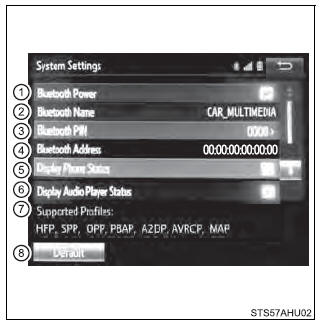
You can confirm and change the detailed Bluetooth settings.
How to check and change detailed Bluetooth settings 1. Display the "Bluetooth Setup" screen. 2. Select "System Settings". 3. The following screen is displayed:
Editing the Bluetooth PIN You can change the PIN-code that is used to register your Bluetooth devices in the system. 1. Select "Bluetooth PIN". 2. Input a PIN-code, and select "OK". |
Toyota Tundra Service Manual > Air Conditioning System(for Manual Air Conditioning System): Air Inlet Damper Control Servo Motor Circuit (B1442/42)
DESCRIPTION The air inlet damper servo motor sends pulse signals to inform the air conditioning amplifier of the damper position. The air conditioning amplifier activates the motor (normal, reverse) based on the signals to move the air inlet damper to any position, which controls the intake air sett ...