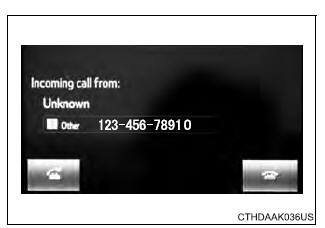
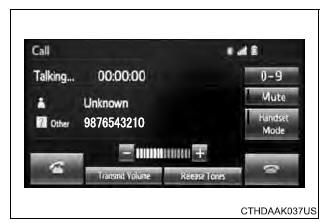
The following screen is displayed when speaking on the phone.
To adjust the call volume Select "-" or "+". You can also adjust the volume using the volume knob. To prevent the other party from hearing your voice Select "Mute". Inputting tones When using phone services such as an answering service or a bank, you can store phone numbers and code numbers in the contact. 1. Select "0-9". 2. Input the number. ■ Release Tones "Release Tones" appear when a continuous tone signal(s) containing a "w" is registered in the contact list. 1. Select "Release Tones". ■Release Tones
To transfer a call Select "Handset Mode" to change from a hands-free call to a cellular phone call. Select "Handset Mode" to off from a cellular phone call to a hands-free call. Transmit volume setting 1. Select "Transmit Volume". 2. Select the desired level for the transmit volume. 3. Select "OK". To hang up Press the Call waiting When a call is interrupted by a third party while talking, an incoming call message will be displayed.
To talk with the other party:
Press the
To refuse the call:
Press the
Every time you press the ■Transferring calls
■Call waiting operation Call waiting operation may differ depending on your phone company and cellular phone. |
Toyota Tundra Service Manual > Air Conditioning System(for Manual Air Conditioning System): Multiplex Communication Circuit (B1499/99)
DESCRIPTION This DTC outputs when CAN communication error is occurred. DTC Code DTC Detection Condition Trouble Area B1499/99 Open in CAN communication circuit CAN communication system PROCEDURE 1. CHECK FOR DTC (a) Clear the DTC (see page ). (b) Check for DTC (see page ). Result Result Proceed to D ...

 switch on the
steering wheel or select
switch on the
steering wheel or select
 .
. switch on the
steering
wheel or select
switch on the
steering
wheel or select
 .
.