
DIAGNOSIS SYSTEM CHECK DLC3 (a) Check the DLC3. Click here INSPECT BATTERY VOLTAGE (a) Measure the vehicle battery voltage. Standard voltage: 11 to 14 V If the voltage is below 11 V, recharge or replace the battery. SELF-DIAGNOSTIC MODE (a) Connect the Techstream to the DLC3. (b) Turn the ignition switch to ON. (c) Turn the Techstream on. (d) Enter the following menus: Body Electrical / Main Body / Utility / Wireless Door Lock Diagnosis Mode. (e) Proceed to the next step in accordance with the prompts on the Techstream screen. (f) Check that the system has switched to self-diagnostic mode by checking the interior light output pattern. 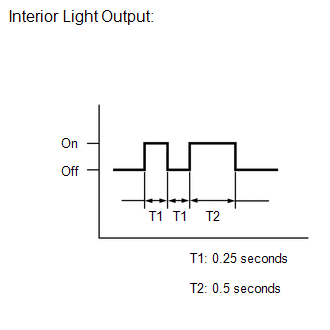
(g) Check that the system has switched to self-diagnostic mode by checking the wireless door lock buzzer output pattern. 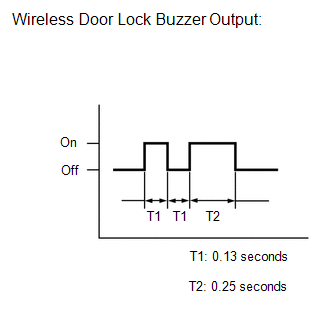
(h) Check the diagnostic outputs when a door control transmitter assembly switch is pressed. The diagnostic outputs can be checked by the interior light and wireless door lock buzzer patterns. 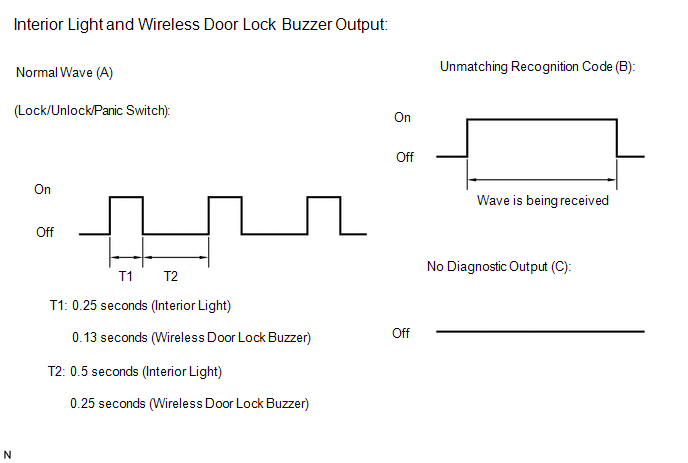 Result Result
|
Toyota Tundra Service Manual > Refrigerant(for Hfc-134a(r134a)): On-vehicle Inspection
ON-VEHICLE INSPECTION PROCEDURE 1. INSPECT REFRIGERANT PRESSURE WITH MANIFOLD GAUGE SET (a) This method uses a manifold gauge set to locate problem areas. Read the manifold gauge pressure when these conditions are established. Test conditions: Temperature at the air inlet is 30 to 35°C (86 to 95°F ...


