Up to 5 Bluetooth devices (Phones (HFP) and audio players
(AVP)) can be registered.
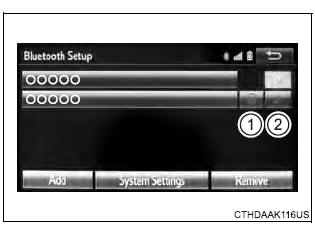
If more than 1 Bluetooth device has been registered, select which device to connect to. 1. Press the "SETUP" button. 2. Select "Bluetooth" on the "Setup" screen. 3. Select the device to be connected. Supported profile icons will be displayed.
Supported profile icons for currently connected devices will illuminate. Dimmed icons can be selected to connect to the function directly. Auto connection To turn auto connection mode on, set "Bluetooth Power" to on. When you register a phone, auto connection will be activated. Always set it to this mode and leave the Bluetooth phone in a place where a connection can be established. When the engine switch is turned to the "ACC" or "ON" position, the system will search for a nearby cellular phone you have registered. Next, the system automatically connects with the most recent of the phones connected to in the past. Then, the connection result is displayed Manual connection When auto connection has failed or "Bluetooth Power" is turned off, you must connect the Bluetooth device manually. Follow the steps in "Connecting a Bluetooth device" from step 1. ■Reconnecting a Bluetooth phone If the system cannot connect due to poor signal strength with the engine switch in the "ACC" or "ON" position, the system will automatically attempt to reconnect. If the system is attempting to connect to a Bluetooth phone and the Bluetooth phone is turned off and then back on, the system will attempt to reconnect. |
Toyota Tundra Service Manual > Airbag System: Diagnostic Trouble Code Chart
DIAGNOSTIC TROUBLE CODE CHART Airbag System DTC No. Detection Item Warning Indicate Test Mode / Check Mode Link B1160 Airbag ECU Malfunction1 Comes on Not applicable B1161 Airbag ECU Malfunction2 Comes on Not applicable B1162 Airbag ECU Malfunction3 Comes on Not applicable B1163 Airbag ECU Malfuncti ...