REMOVAL PROCEDURE 1. PRECAUTION NOTICE: After
turning the ignition switch off, waiting time may be required before
disconnecting the cable from the battery terminal. Therefore, make sure
to read the disconnecting the cable from the battery terminal notice
before proceeding with work (See page 2. DISCONNECT CABLE FROM NEGATIVE BATTERY TERMINAL NOTICE: When disconnecting the cable, some systems need to be initialized after the cable is reconnected (See page
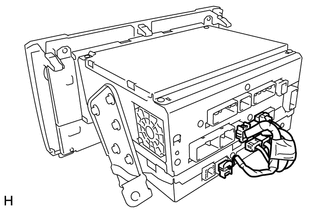
3. REMOVE SHIFT LEVER KNOB SUB-ASSEMBLY 4. REMOVE REAR UPPER CONSOLE PANEL SUB-ASSEMBLY 5. REMOVE UPPER CONSOLE PANEL SUB-ASSEMBLY 6. REMOVE AIR CONDITIONING CONTROL ASSEMBLY 7. REMOVE RADIO AND DISPLAY RECEIVER ASSEMBLY 8. REMOVE NO. 1 NAVIGATION WIRE
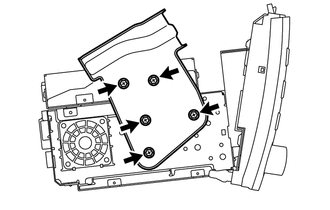
9. REMOVE NO. 1 RADIO RECEIVER BRACKET
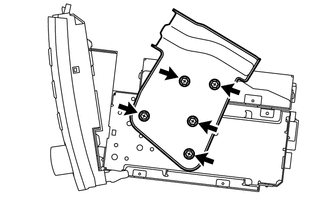
10. REMOVE NO. 2 RADIO RECEIVER BRACKET
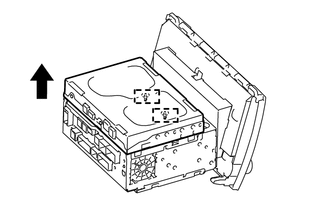
11. REMOVE STEREO COMPONENT TUNER ASSEMBLY
|
Toyota Tundra Service Manual > Cruise Control System: Road Test
ROAD TEST PROBLEM SYMPTOM CONFIRMATION (a) Inspect the SET function. (1) Turn the cruise control system on using the cruise control main switch (ON-OFF button). *a ON-OFF (2) Check that the cruise control indicator illuminates in the combination meter assembly. (3) Drive at a speed between approxima ...