REMOVAL PROCEDURE 1. PRECAUTION NOTICE: After
turning the ignition switch off, waiting time may be required before
disconnecting the cable from the battery terminal. Therefore, make sure
to read the disconnecting the cable from the battery terminal notice
before proceeding with work (See page 2. DISCONNECT CABLE FROM NEGATIVE BATTERY TERMINAL 3. REMOVE FAN AND GENERATOR V BELT (a) Remove the fan and generator V belt (See page
4. REMOVE AIR CLEANER ASSEMBLY
5. REMOVE FRONT FENDER APRON SEAL RH 6. DISCONNECT POWER STEERING OIL PRESSURE SWITCH CONNECTOR 7. DISCONNECT VANE PUMP ASSEMBLY 8. REMOVE GENERATOR ASSEMBLY
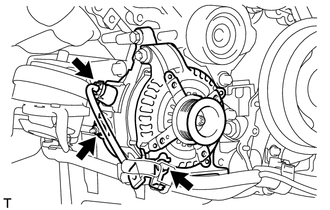
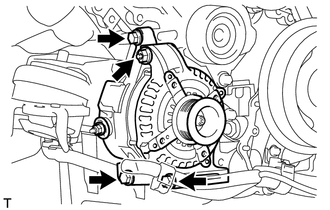
(b) Disconnect the generator connector. (c) Remove the nut and disconnect the generator wire. (d) Remove the bolt and disconnect the wire harness bracket from the generator.
|
Toyota Tundra Service Manual > Occupant Classification System: Rear Occupant Classification Sensor RH Collision Detection (B1788)
DESCRIPTION DTC B1788 is set when the occupant classification ECU receives a collision detection signal, which is sent by the occupant detection sensor rear RH when an accident occurs. DTC B1788 is also set when the front seat frame with adjuster RH is subjected to a strong impact, even if an actual ...