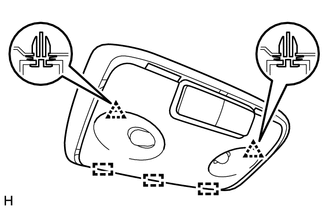
Components COMPONENTS ILLUSTRATION 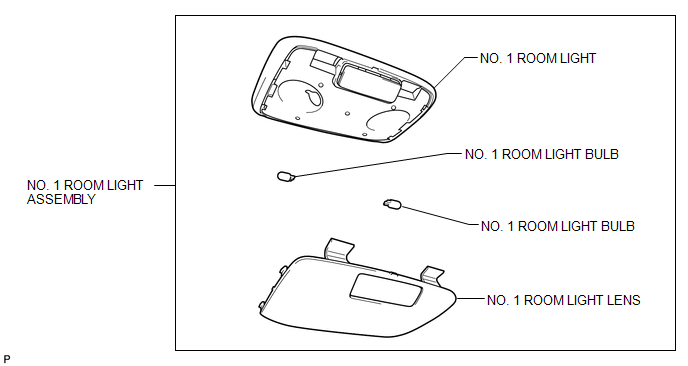
Disassembly DISASSEMBLY PROCEDURE 1. REMOVE NO. 1 ROOM LIGHT BULB 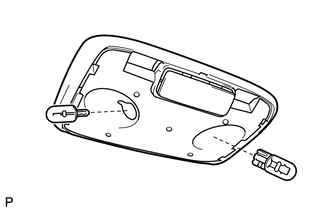
(a) Remove the 2 No. 1 room light bulbs from the No. 1 room light. Installation INSTALLATION PROCEDURE 1. INSTALL NO. 1 ROOM LIGHT ASSEMBLY (a) Attach the 3 guides and 2 clips to install the No. 1 room light assembly. (b) Attach the 2 guides and 4 claws to install the No. 1 room light lens. Reassembly REASSEMBLY PROCEDURE 1. INSTALL NO. 1 ROOM LIGHT BULB (a) Install the 2 No. 1 room light bulbs to the No. 1 room light. Removal REMOVAL PROCEDURE 1. REMOVE NO. 1 ROOM LIGHT ASSEMBLY 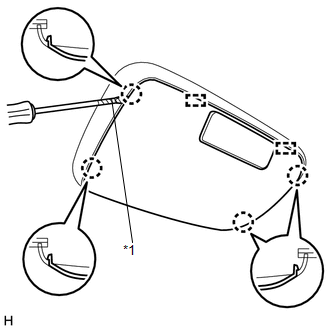
(a) Using a screwdriver, detach the 4 claws and 2 guides and remove the No. 1 room light lens. Text in Illustration
|
Toyota Tundra Service Manual > Front Door(for Double Cab): On-vehicle Inspection
ON-VEHICLE INSPECTION PROCEDURE 1. INSPECT FRONT DOOR PANEL SUB-ASSEMBLY LH (a) Check that the clearance measurements of areas A to J are within the standard range. Standard measurement: Area Specified Condition Area Specified Condition A 3.7 to 6.7 mm (0.146 to 0.264 in.) F 2.7 to 5.7 mm (0.106 to ...