
DESCRIPTION When the outer mirror switch assembly (mirror retract switch) is operated, return/retract signals are sent to the main body ECU (multiplex network body ECU). The main body ECU (multiplex network body ECU) sends return/retract signals to the outer mirror control ECU assembly via CAN communication. The outer mirror control ECU assembly returns and retracts the outer rear view mirror assembly based on the received signals. WIRING DIAGRAM 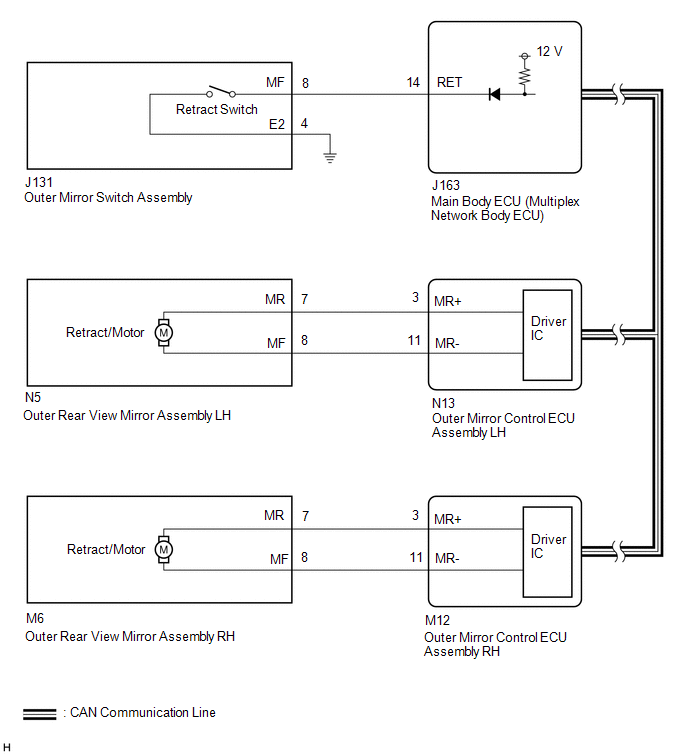
CAUTION / NOTICE / HINT NOTICE: First perform the communication function inspections in How to Proceed with Troubleshooting to confirm that there are no CAN communication malfunctions before troubleshooting this problem. Click here PROCEDURE
(a) Using the Techstream, read the Data List. Click here
OK: On the Techstream screen, ON or OFF is displayed for each item according to the table above.
(a) Check the malfunctioning parts. Click here
(a) Remove the outer rear view mirror assembly LH. Click here (b) Inspect the outer rear view mirror assembly LH. Click here
(a) Disconnect the N5 outer rear view mirror assembly LH connector. (b) Disconnect the N13 outer mirror control ECU assembly LH connector. (c) Measure the resistance according to the value(s) in the table below. Standard Resistance:
(a) Remove the outer rear view mirror assembly RH. Click here (b) Inspect the outer rear view mirror assembly RH. Click here
(a) Disconnect the M6 outer rear view mirror assembly RH connector. (b) Disconnect the M12 outer mirror control ECU assembly RH connector. (c) Measure the resistance according to the value(s) in the table below. Standard Resistance:
(a) Remove the outer mirror switch assembly. Click here (b) Inspect the outer mirror switch assembly. Click here
(a) Disconnect the J131 outer mirror switch assembly connector. (b) Disconnect the J163 main body ECU (multiplex network body ECU) connector. (c) Measure the resistance according to the value(s) in the table below. Standard Resistance:
|
Toyota Tundra Service Manual > Satellite Radio Tuner(for Column Shift Type): Removal
REMOVAL PROCEDURE 1. PRECAUTION NOTICE: After turning the ignition switch off, waiting time may be required before disconnecting the cable from the battery terminal. Therefore, make sure to read the disconnecting the cable from the battery terminal notice before proceeding with work (See page ). 2. ...


