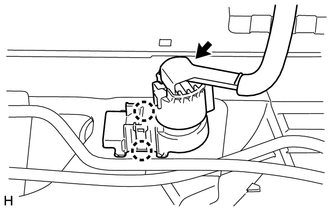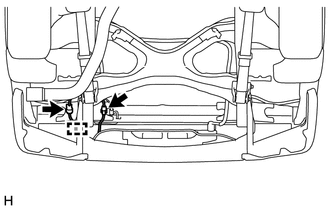
REMOVAL CAUTION / NOTICE / HINT CAUTION: As the rear bumper cover is extremely heavy, the engine lifter may suddenly drop if the instructions listed in the repair manual are not followed. Therefore, always follow the instructions listed in the repair manual when performing this procedure. PROCEDURE 1. REMOVE WIRING HARNESS CONNECTOR (w/ Towing Package)
(b) Detach the 2 claws and remove the wiring harness connector. 2. REMOVE CONNECTOR COVER (w/o Towing Package) HINT: Use the same procedure described for the wiring harness connector. 3. REMOVE REAR BUMPER COVER
(b) w/ Towing Package: (1) Using an engine lifter or equivalent, remove the 12 bolts and rear bumper cover. 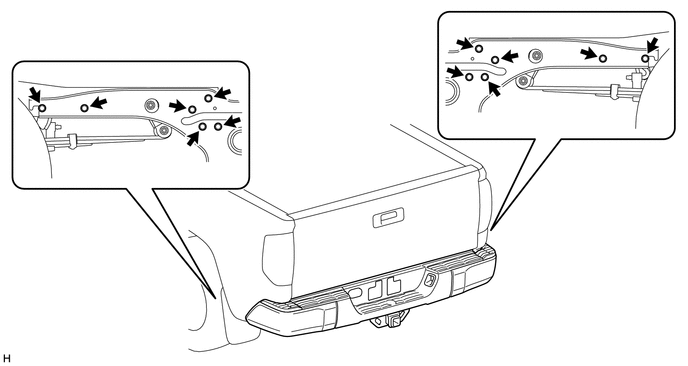
NOTICE:
(c) w/o Towing Package: (1) Using an engine lifter or equivalent, remove the 8 bolts and rear bumper cover. 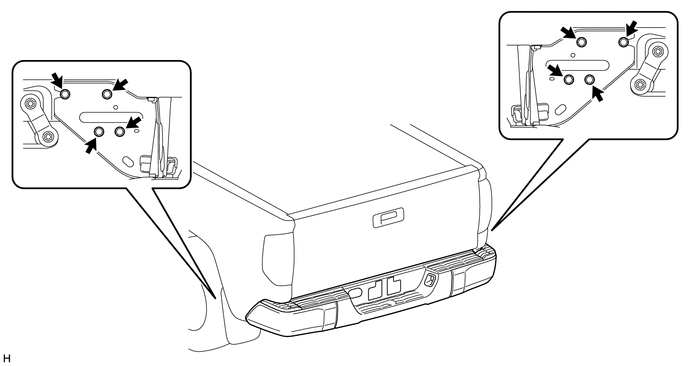
NOTICE:
|
Toyota Tundra Service Manual > Navigation System: Disc cannot be Ejected
PROCEDURE 1. PRESS "EJECT" AND CHECK OPERATION (a) Press the disc eject switch of the navigation receiver assembly for 2 seconds or more and check that the disc is ejected. OK: Disc is ejected. Result Result Proceed to OK A NG (for Column Shift Type) B NG (for Floor Shift Type) C B REPLACE NAVIGATIO ...