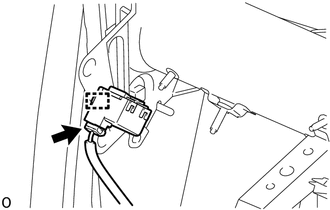
REMOVAL PROCEDURE 1. REMOVE FRONT DOOR SCUFF PLATE LH Click here 2. REMOVE COWL SIDE TRIM BOARD LH Click here 3. REMOVE INSTRUMENT SIDE PANEL LH Click here 4. REMOVE HOOD LOCK CONTROL LEVER SUB-ASSEMBLY Click here 5. REMOVE LOWER INSTRUMENT PANEL FINISH PANEL SUB-ASSEMBLY LH Click here 6. REMOVE SKID CONTROL BUZZER ASSEMBLY
(b) Disconnect the connector. |
Toyota Tundra Service Manual > Transmission Wire: Installation
INSTALLATION PROCEDURE 1. INSTALL TRANSMISSION WIRE (a) Coat a new O-ring with ATF, and install it to the transmission wire connector. (b) Install the transmission wire with the bolt. Torque: 5.4 N·m {55 kgf·cm, 48 in·lbf} (c) Connect the transmission wire connector. HINT: Push up the lever until ...