
DESCRIPTION This circuit is used when the voice guidance in the navigation system is on or an incoming cellular phone voice in the "Bluetooth" hands-free system is heard. Using this circuit, the navigation receiver assembly sends the signals to the stereo component amplifier assembly. WIRING DIAGRAM 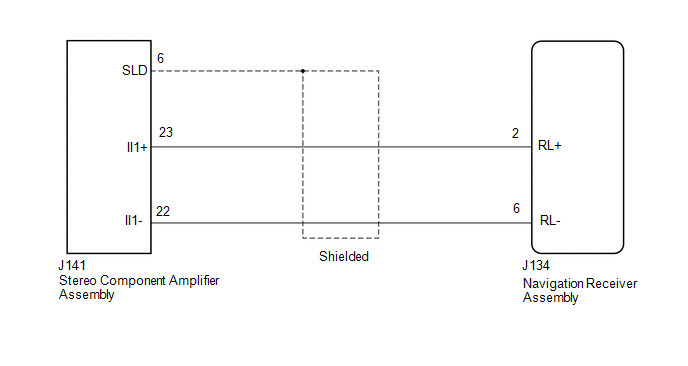 PROCEDURE
(a) Disconnect the J134 navigation receiver assembly connector. (b) Disconnect the J141 stereo component amplifier connector. (c) Measure the resistance according to the value(s) in the table below. Standard Resistance:
|
Toyota Tundra Service Manual > Seat Belt: Child Restraint Seat Anchor Bracket(for Crewmax Lh Side)
Components COMPONENTS ILLUSTRATION Installation INSTALLATION CAUTION / NOTICE / HINT CAUTION: Wear protective gloves. Sharp areas on the parts may injure your hands. PROCEDURE 1. INSTALL TETHER ANCHOR BRACKET SUB-ASSEMBLY (a) Install the 2 tether anchor bracket sub-assemblies with the 2 bolts. Torqu ...


