
REMOVAL PROCEDURE 1. REMOVE V-BANK COVER SUB-ASSEMBLY 2. REMOVE AIR CLEANER HOSE ASSEMBLY 3. REMOVE CAMSHAFT TIMING OIL CONTROL VALVE ASSEMBLY (for Exhaust Side of Bank 1) 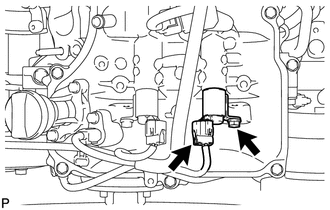 (a) Disconnect the oil control valve connector. (b) Remove the bolt and oil control valve. (c) Remove the O-ring from the oil control valve. 4. REMOVE CAMSHAFT TIMING OIL CONTROL VALVE ASSEMBLY (for Intake Side of Bank 1) 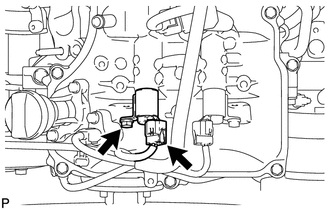 (a) Disconnect the oil control valve connector. (b) Remove the bolt and oil control valve. (c) Remove the O-ring from the oil control valve. 5. REMOVE CAMSHAFT TIMING OIL CONTROL VALVE ASSEMBLY (for Intake Side of Bank 2) 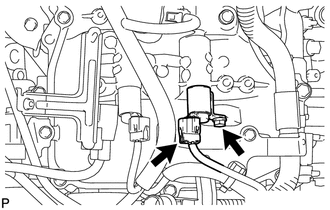 (a) Disconnect the oil control valve connector. (b) Remove the bolt and oil control valve. (c) Remove the O-ring from the oil control valve. 6. REMOVE CAMSHAFT TIMING OIL CONTROL VALVE ASSEMBLY (for Exhaust Side of Bank 2) 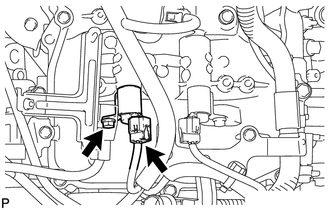 (a) Disconnect the oil control valve connector. (b) Remove the bolt and oil control valve. (c) Remove the O-ring from the oil control valve. |
Toyota Tundra Service Manual > Wiper And Washer System: Data List / Active Test
DATA LIST / ACTIVE TEST 1. DATA LIST HINT: Using the Techstream to read the Data List allows values or status of switches, sensors, actuators and other items to be read without removing any parts. This non-intrusive inspection can be very useful because intermittent conditions or signals may be disc ...


