
Components COMPONENTS ILLUSTRATION 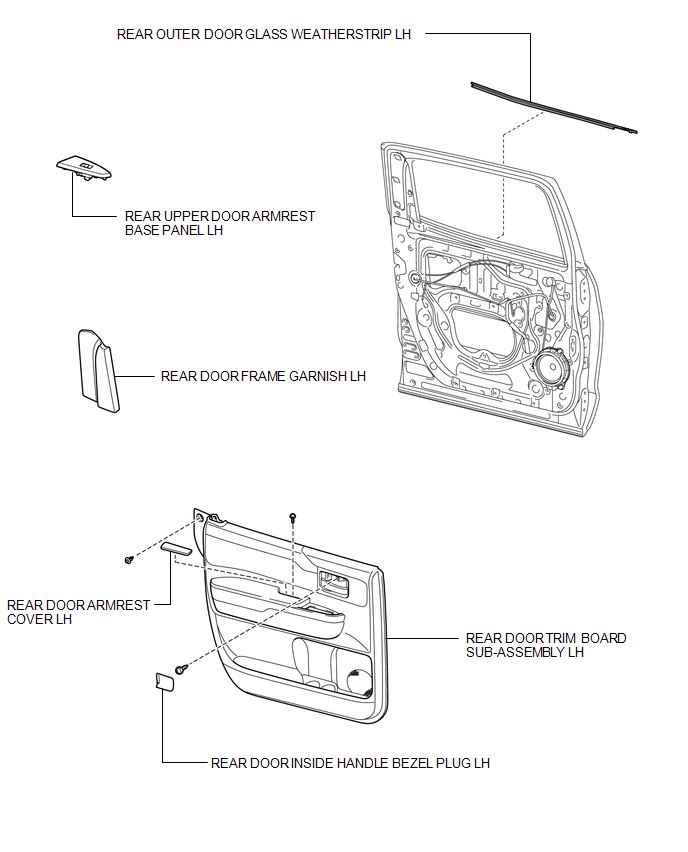
Installation INSTALLATION CAUTION / NOTICE / HINT HINT:
PROCEDURE 1. INSTALL REAR OUTER DOOR GLASS WEATHERSTRIP LH 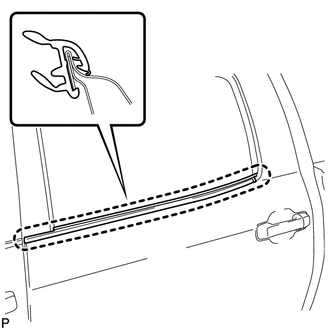
(a) Attach the claw to install the weatherstrip. 2. INSTALL REAR DOOR TRIM BOARD SUB-ASSEMBLY LH
3. INSTALL REAR DOOR ARMREST COVER LH 4. INSTALL REAR DOOR FRAME GARNISH LH
5. INSTALL REAR UPPER DOOR ARMREST BASE PANEL LH
6. INSTALL REAR DOOR INSIDE HANDLE BEZEL PLUG LH
Removal REMOVAL CAUTION / NOTICE / HINT HINT:
PROCEDURE 1. REMOVE REAR DOOR INSIDE HANDLE BEZEL PLUG LH
2. REMOVE REAR UPPER DOOR ARMREST BASE PANEL LH
3. REMOVE REAR DOOR FRAME GARNISH LH
4. REMOVE REAR DOOR ARMREST COVER LH 5. REMOVE REAR DOOR TRIM BOARD SUB-ASSEMBLY LH
6. REMOVE REAR OUTER DOOR GLASS WEATHERSTRIP LH 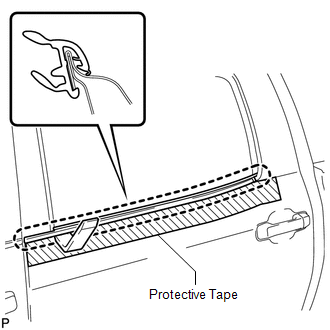
(a) Put protective tape around the weatherstrip outer. (b) Using a moulding remover, detach the claw and remove the weatherstrip. |
Toyota Tundra Service Manual > Tire Pressure Warning System: Initialization
INITIALIZATION NOTICE: Initialization can be confirmed through the tire pressure warning light. If the ignition switch is turned off during initialization, the tire pressure warning ECU and receiver memorizes that initialization was being performed. Therefore, it is not necessary to perform the init ...


