
REMOVAL PROCEDURE 1. PRECAUTION NOTICE: After turning the ignition switch off, waiting time may be required before disconnecting
the cable from the battery terminal. Therefore, make sure to read the disconnecting
the cable from the battery terminal notice before proceeding with work (See page
2. DISCONNECT CABLE FROM NEGATIVE BATTERY TERMINAL NOTICE: When disconnecting the cable, some systems need to be initialized after the cable
is reconnected (See page 3. REMOVE SPIRAL CABLE SUB-ASSEMBLY (See page 4. REMOVE WINDSHIELD WIPER SWITCH ASSEMBLY
5. REMOVE HEADLIGHT DIMMER SWITCH ASSEMBLY (a) Disconnect the connector. (b) While loosening the band clamp as shown in the illustration, detach the claw. 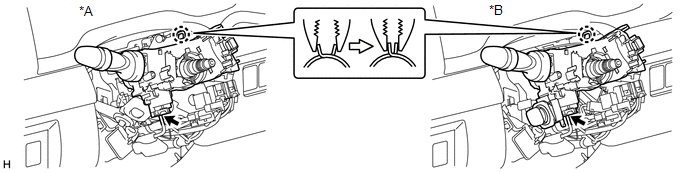 Text in Illustration Text in Illustration
(c) Remove the headlight dimmer switch assembly. NOTICE: If the claw is pressed forcefully, it will break. 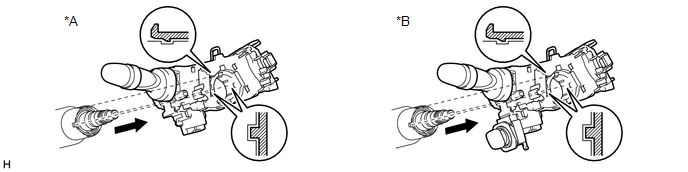 Text in Illustration Text in Illustration
|
Toyota Tundra Service Manual > Front Door Lock(for Double Cab): Removal
REMOVAL CAUTION / NOTICE / HINT HINT: Use the same procedures for the LH side and RH side. The procedures listed below are for the LH side. PROCEDURE 1. PRECAUTION NOTICE: After turning the ignition switch off, waiting time may be required before disconnecting the cable from the battery terminal. Th ...


