
INSTALLATION PROCEDURE 1. INSTALL UNLOCK WARNING SWITCH ASSEMBLY 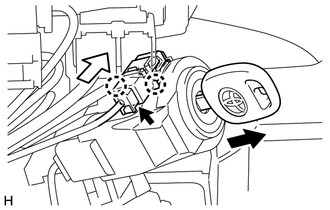
(a) Attach the 2 claws to install the unlock warning switch assembly onto the upper steering column bracket assembly. HINT: Slide the unlock warning switch assembly in the direction shown by the arrow in the illustration to install it. (b) Remove the key. (c) Connect the connector. Text in Illustration
2. INSTALL UPPER STEERING COLUMN COVER (for Power Tilt and Power Telescopic Steering Column)
3. INSTALL LOWER STEERING COLUMN COVER (for Power Tilt and Power Telescopic Steering Column)
4. INSTALL UPPER STEERING COLUMN COVER (for Manual Tilt and Manual Telescopic Steering Column)
5. INSTALL LOWER STEERING COLUMN COVER (for Manual Tilt and Manual Telescopic Steering Column)
6. INSTALL UPPER STEERING COLUMN COVER (for Manual Tilt)
7. INSTALL LOWER STEERING COLUMN COVER (for Manual Tilt)
|
Toyota Tundra Service Manual > Sfi System: Intake Air Temperature Sensor 1 Circuit Range / Performance (P0111)
DESCRIPTION The Intake Air Temperature (IAT) sensor, mounted on the Mass Air Flow (MAF) meter, monitors the IAT. The IAT sensor has a built-in thermistor with a resistance that varies according to the temperature of the intake air. When the IAT is low, the resistance of the thermistor increases. Whe ...


